Master Backgammon: Turn Your Mistakes Into Anki Flashcards

Drag match files or paste position IDs. Analyze with GNU Backgammon, eXtreme Gammon or HedgeHog, filter blunders, export in one click.

Desktop app

The full version for Windows, macOS and Linux.

  • Paste a position ID and get it analyzed with GNU Backgammon, eXtreme Gammon or HedgeHog
  • .xg, .xgp, .ogxm, .mat, .sgf and .txt files, and text copied from eXtreme Gammon
  • Score matrices and cube comparisons
  • Decks organized in a tree that stays in sync with Anki
Download AnkiGammon

In your browser

Nothing to install, works on phones and tablets.

  • .xg, .xgp and HedgeHog .ogxm files, and text copied from XG
  • .mat, .sgf and .txt matches and pasted position IDs, analyzed with HedgeHog (free account)
  • The same cards as the desktop app, score matrices included
  • Download an .apkg, or send cards straight to Anki from Chrome, Edge or Firefox
Open the web app

No Anki? The free trainer quizzes your positions on any device, with spaced repetition, and works offline on your phone.

Free & Open Source Windows, macOS, Linux & your browser

Analysis partner HedgeHog, the online backgammon engine, is built into AnkiGammon on desktop and in the browser. Connect a free account once, nothing to install.

Backgammon Study Features

Turn your backgammon mistakes into lasting skills with Anki. Full control over your study cards while the app handles the boring stuff automatically.

Drop In Anything Backgammon

Drag match or position files onto the window, or paste an XGID, OGID, GNUID, or full XG analysis straight in. Format is detected automatically, pre-analyzed positions are kept, and the rest get analyzed for you. To set up a position from scratch, use the free backgammon position editor and copy its XGID.

Score Matrix Generation

Optionally generate detailed score matrices showing optimal cube actions and best moves at different match scores. Helps you understand how match score affects decisions.

Customize Board Appearance

Choose from 7 color schemes (Classic, Forest, Ocean, Desert, Sunset, Midnight, Monochrome) and toggle board orientation (clockwise/counter-clockwise). All settings save automatically.

Pair With Your Favorite Engine

Point AnkiGammon at your install of GNU Backgammon (free, cross-platform) at the depth you choose, or eXtreme Gammon on Windows (experimental). Or connect a HedgeHog account and analyze online, with nothing to install, on desktop or in the web app. AnkiGammon runs the analysis for you.

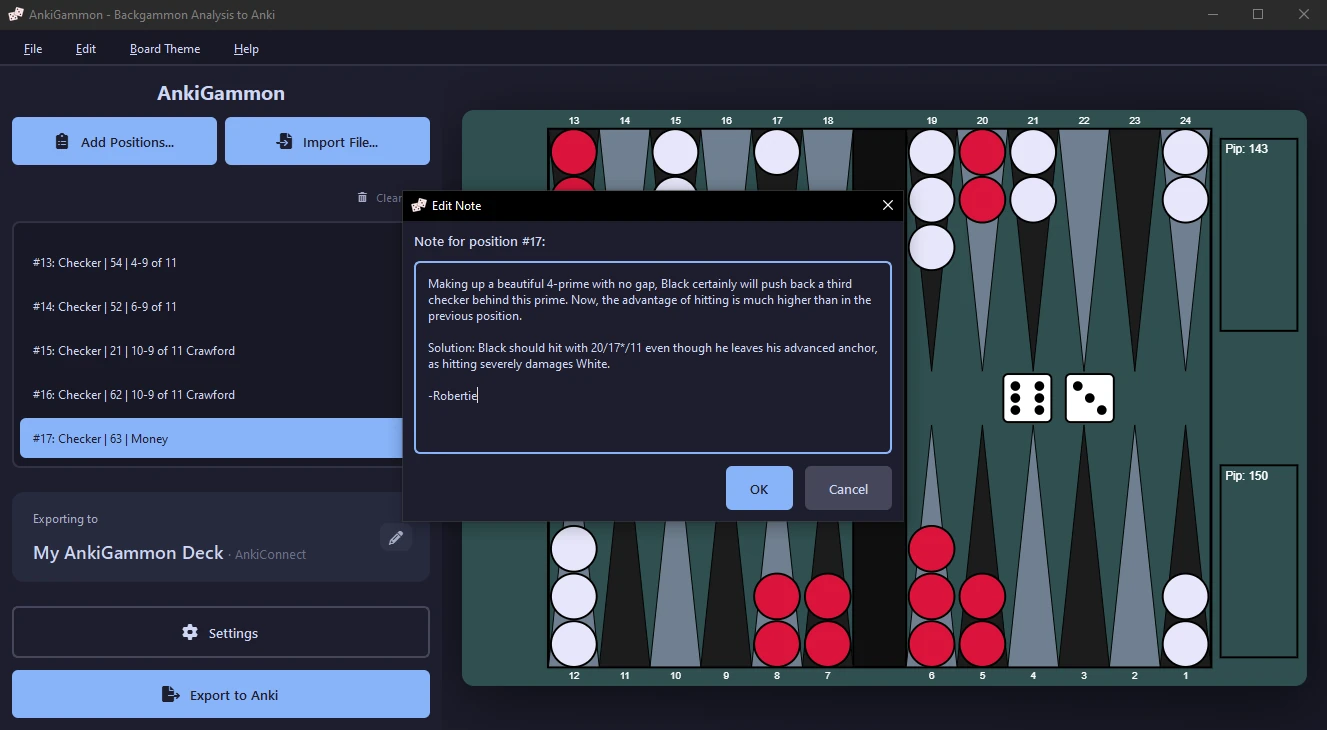
Add Custom Notes to Positions

Add your own explanations, insights, and reminders to any position. Your notes appear on the flashcard back, making it easy to capture key lessons and strategic patterns while building your deck.

Interactive Move Visualization

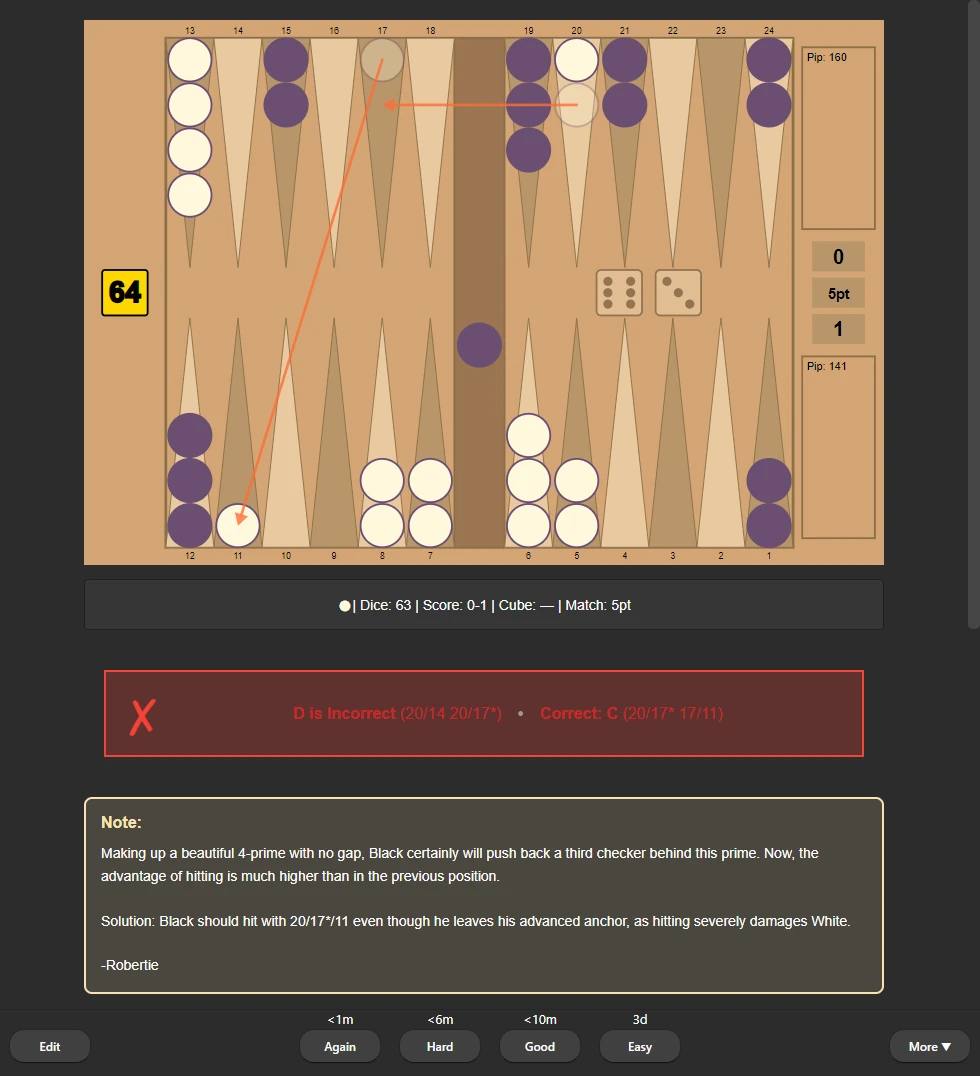
Click moves on the card back to see animated checker movements with smooth arc paths. Optional feature you can enable/disable to match your learning preference.

Study in Anki, or Without It

Send cards to a running Anki in one click with AnkiConnect, or download an .apkg for any Anki app. No Anki? Export a study pack for the free browser trainer, which schedules your reviews on a phone or computer, even offline.

Build a Library, Not a Pile

Sort positions into named decks and subdecks with drag-and-drop, drop files straight onto the deck you want, and stay in sync with Anki.

Full Move Analysis

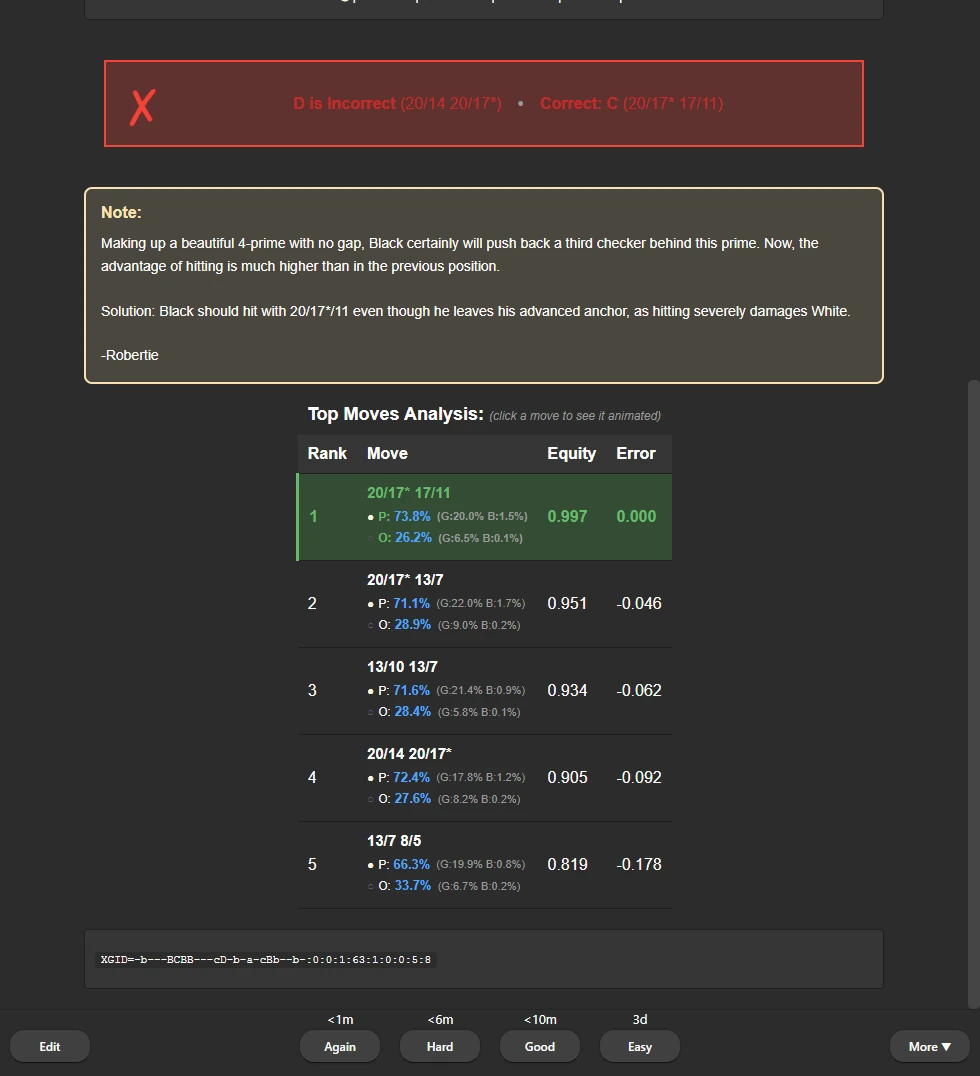
Every card includes equity values, win/gammon/backgammon percentages, and error calculations for all candidate moves. Show options on the front or hide them.

From Backgammon Analysis to Anki Cards in Seconds

From import to Anki export in seconds. AnkiGammon handles the boring stuff while you control how your cards look.

1

Launch the App

No installation necessary. Download and run, or open the web app in your browser.

2

Import Positions

Drag files or paste position IDs. Anything not yet analyzed goes to GNU Backgammon, eXtreme Gammon or HedgeHog. Filter by error threshold and player.

3

Customize & Add Notes

Add notes, pick colors, toggle options visibility. Settings auto-save.

4

Export to Anki

One-click export via AnkiConnect or APKG files.

See It In Action

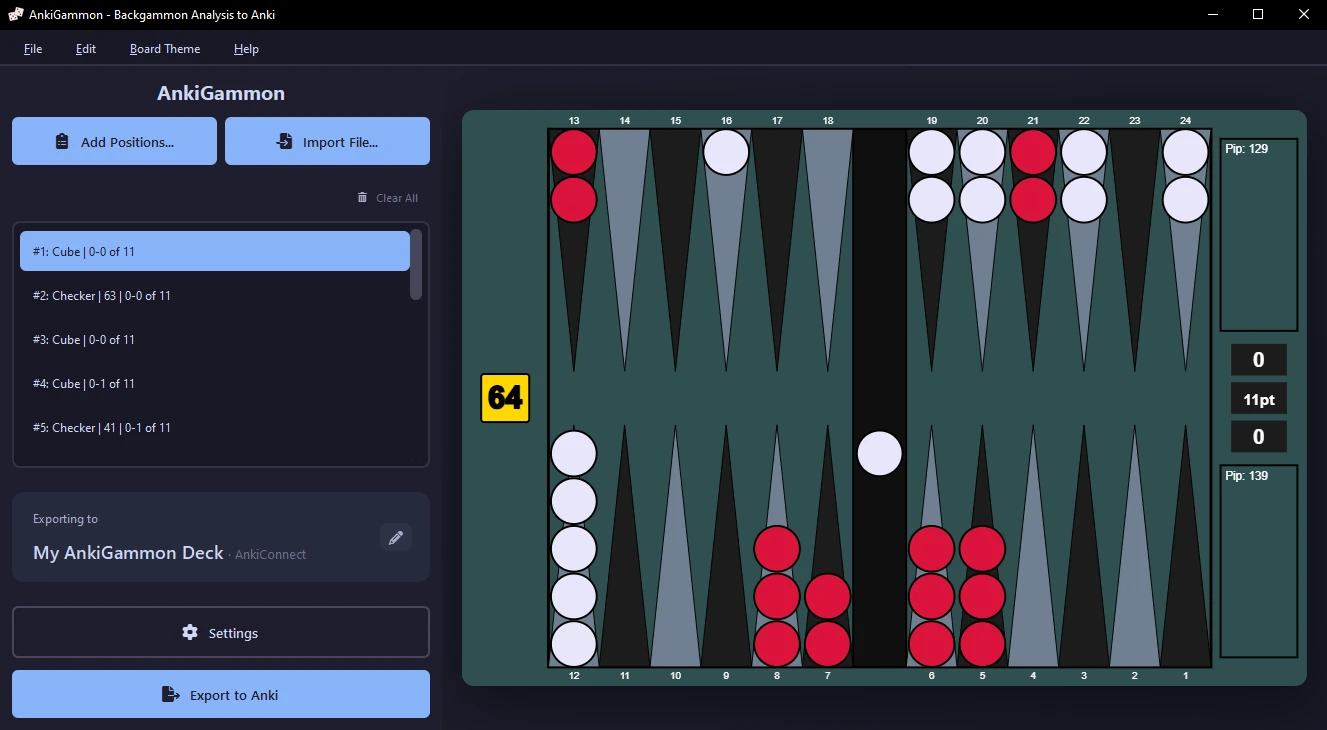
AnkiGammon main window with a deck tree of imported positions and a board preview

Main Window - Your positions in decks and subdecks, with a live board preview

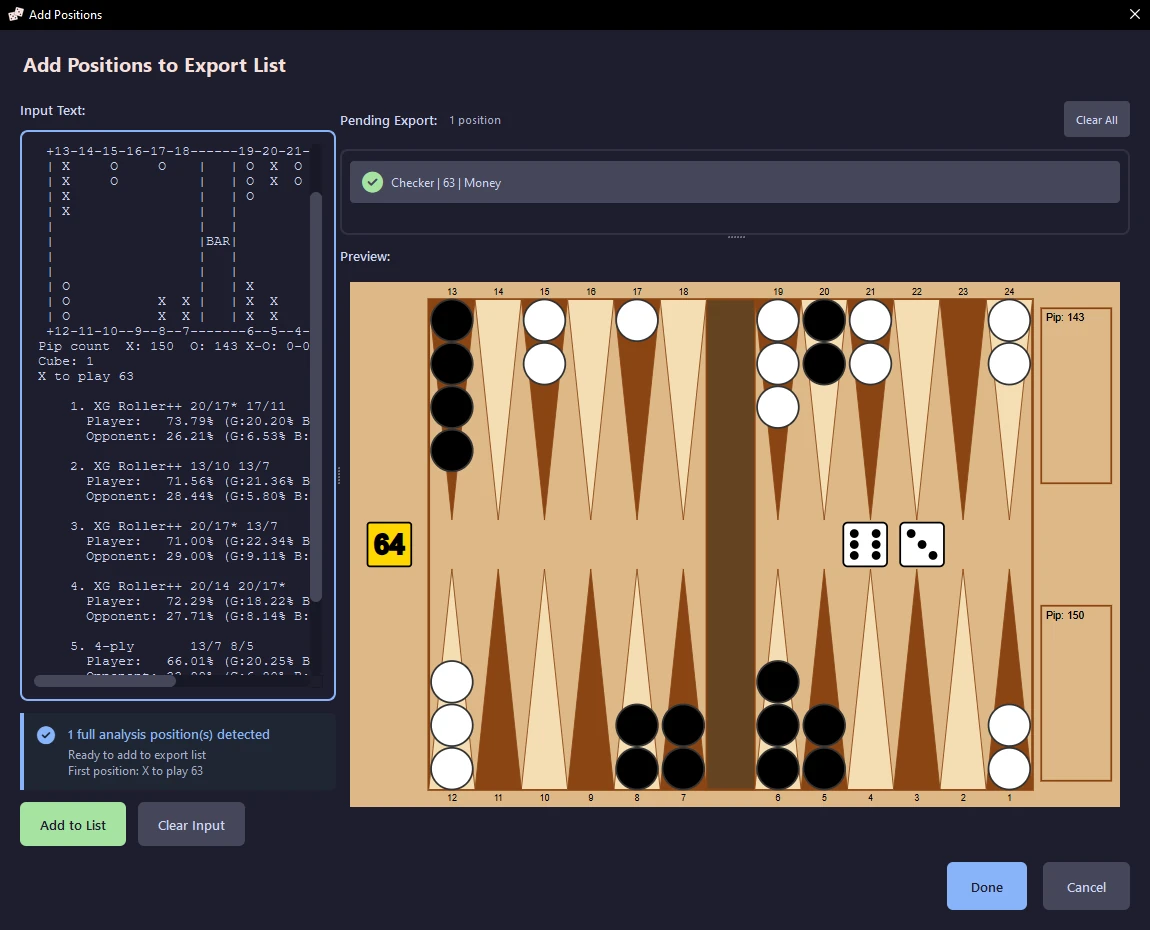
Add positions dialog detecting pasted XG analysis text

Add Positions - Paste XGID, OGID, GNUID, or full XG analysis text

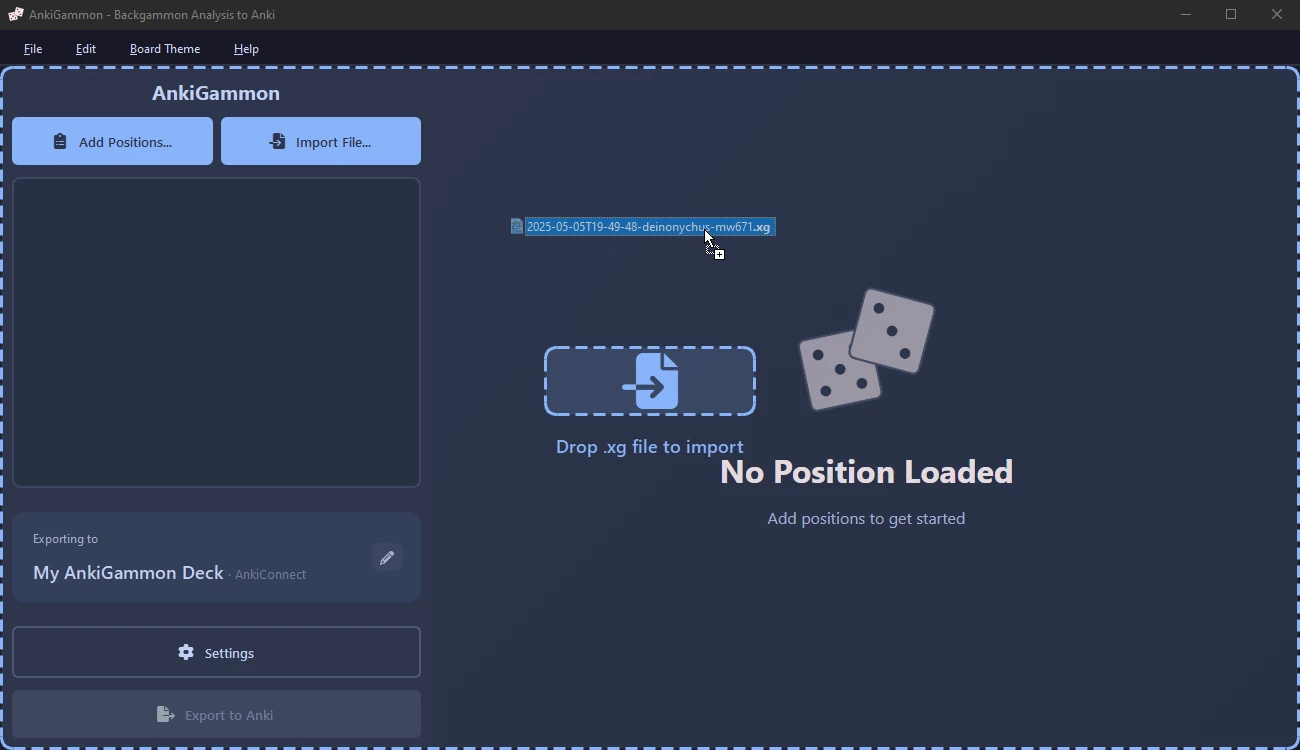
Dropping a match file onto the AnkiGammon window

Drag & Drop - Import .xg, .xgp, .ogxm, .mat and .sgf files, keeping only the mistakes

Editing the note on a position

Edit Notes - Add your own explanations and insights to each position

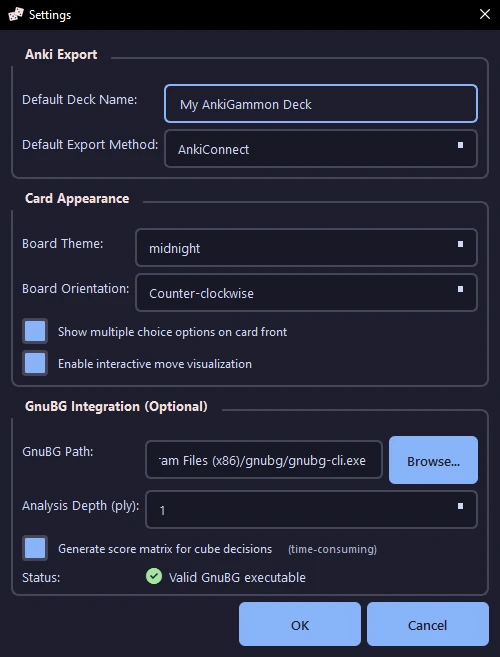
Settings dialog with HedgeHog chosen as the analysis engine and a connected HedgeHog account, plus export, board and study options

Settings - GNU Backgammon, eXtreme Gammon or HedgeHog, score matrices, board themes and study options

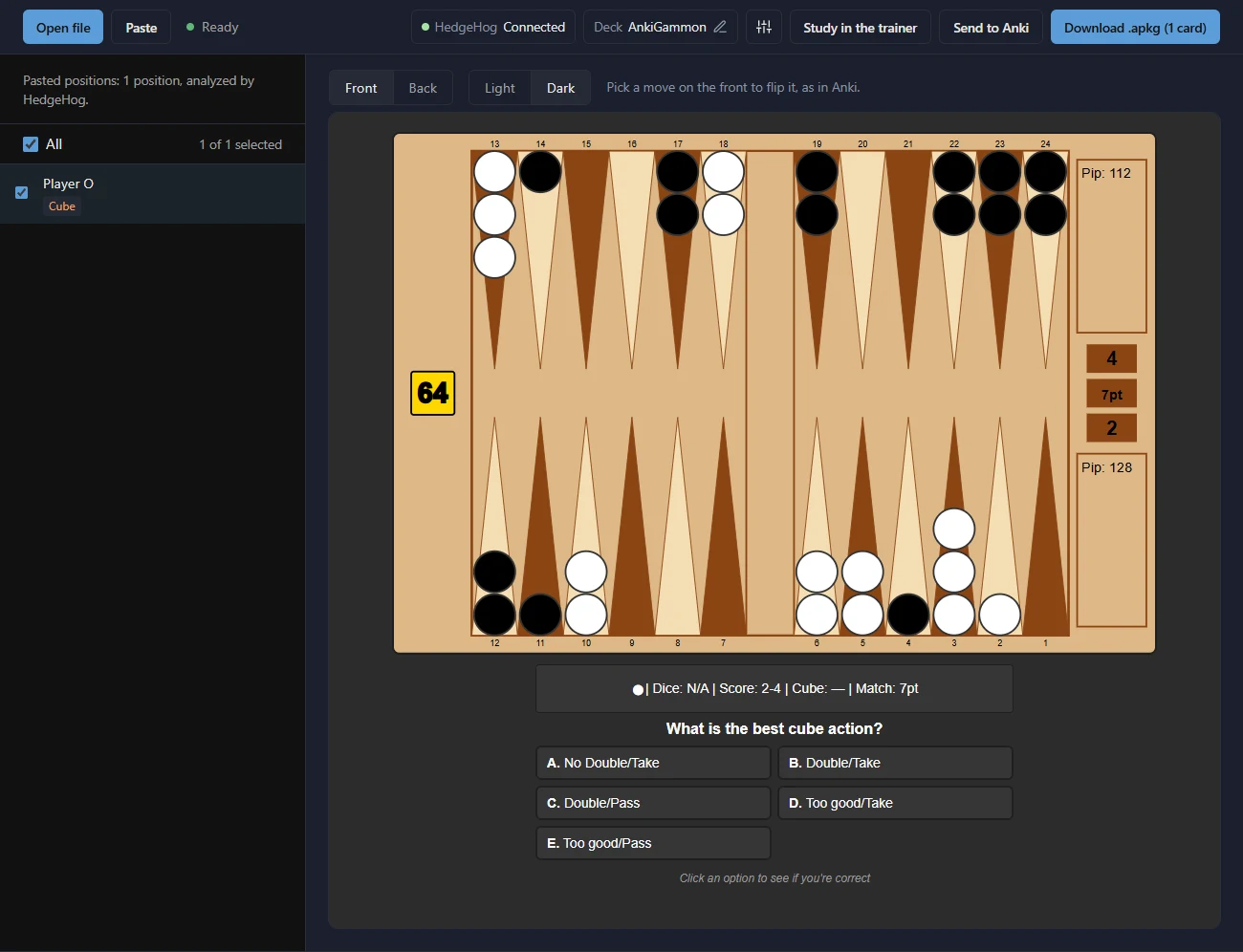
AnkiGammon web app in the browser with HedgeHog connected, showing a cube decision flashcard from a pasted XGID

Web App - Paste a position ID or open a match in your browser, and HedgeHog analyzes it

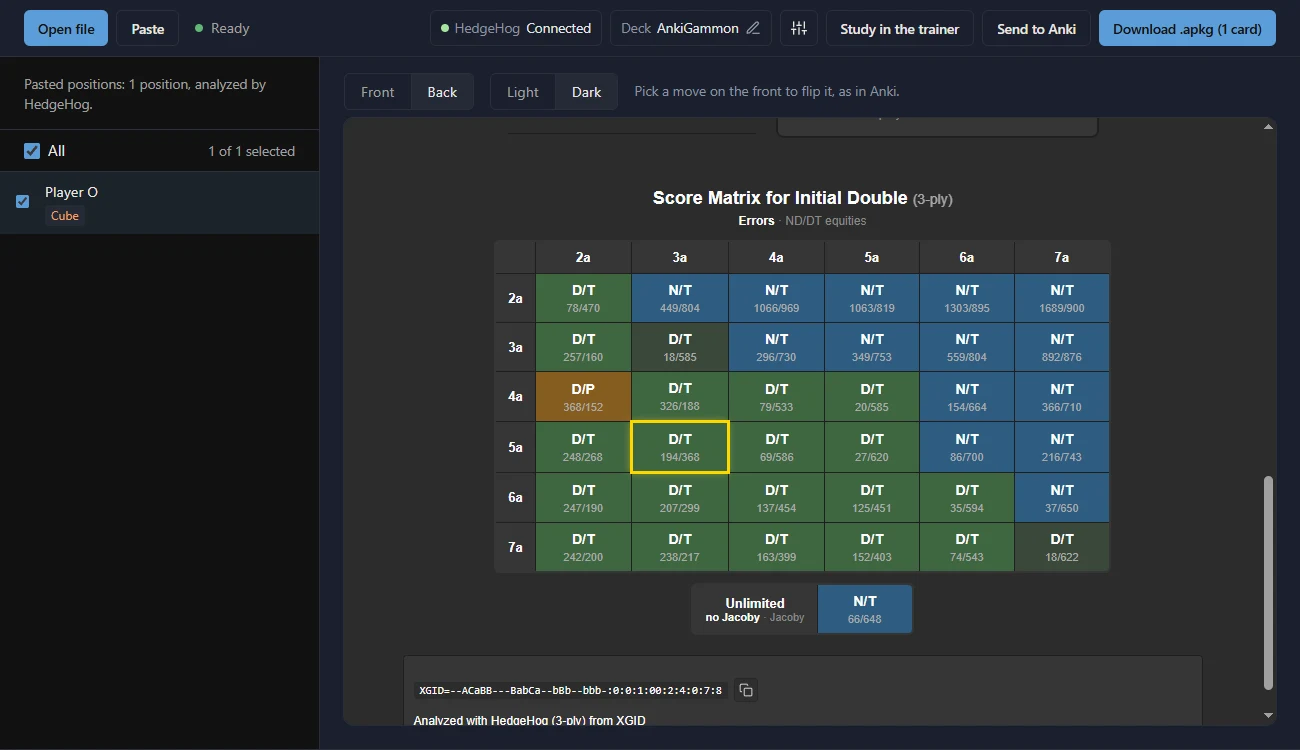
Score matrix of cube actions at every score of a 7-point match, analyzed by HedgeHog in the AnkiGammon web app

Web App Score Matrix - Cube actions at every match score, analyzed by HedgeHog

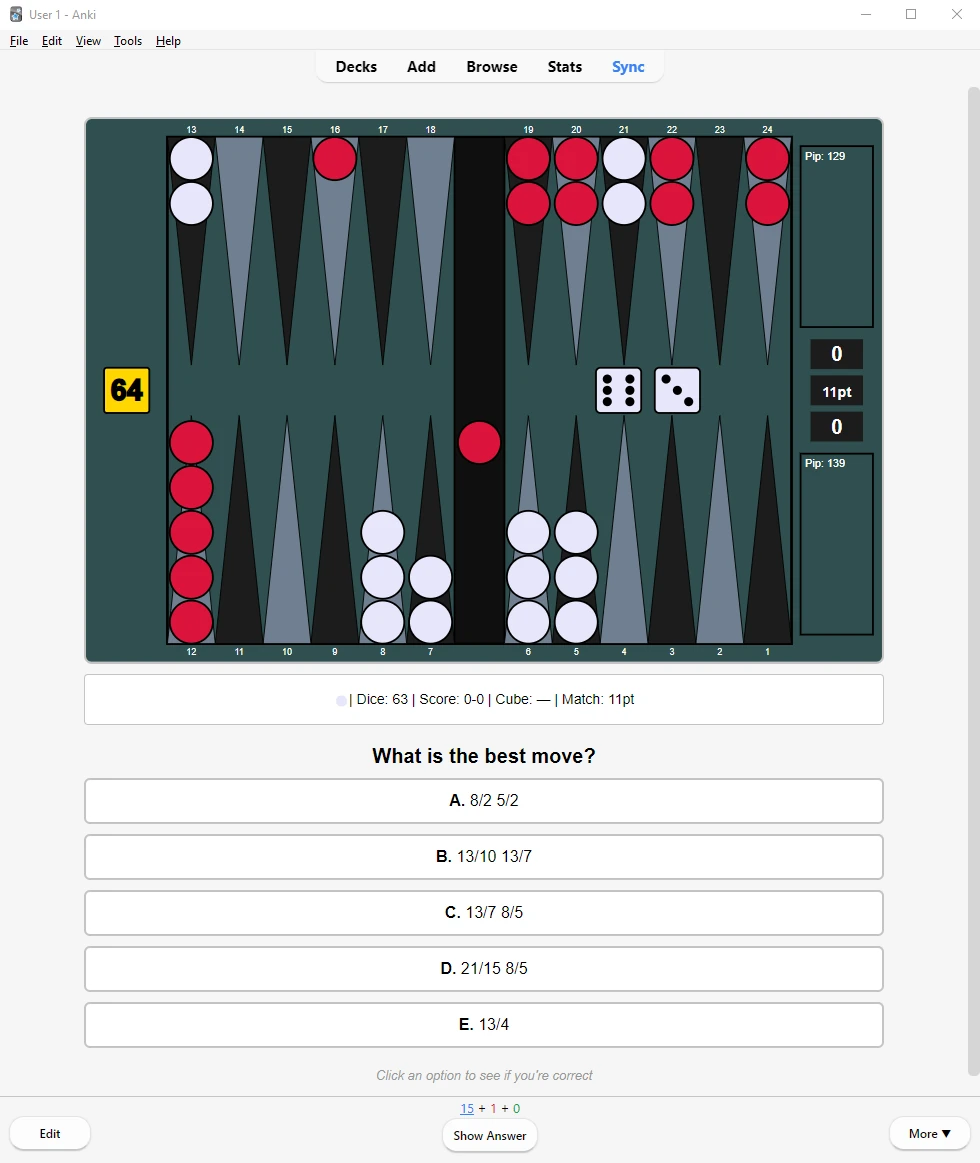
Anki flashcard front with a backgammon position and multiple-choice moves

Card Front - Multiple-choice questions with clean board graphics

Anki flashcard back showing a wrong answer, the move analysis and a note

Card Back - See what you missed, with equities, the played move and your notes

Clicking a move in the analysis animates it on the board

Interactive Moves - Click any move in the analysis to see it played on the board

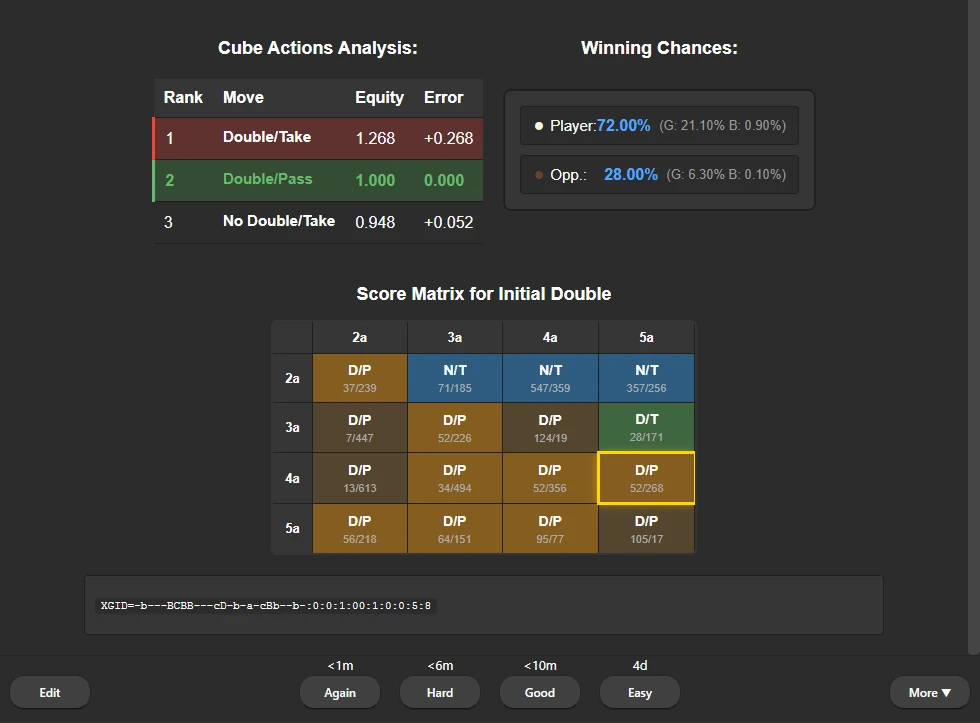
Score matrix of cube actions across match scores

Score Matrix - The right cube action at every match score (optional)

Download AnkiGammon - Free Backgammon Anki Training Software

Windows
macOS
Linux

Windows

Download ZIP
  1. Extract the ZIP file and double-click ankigammon.exe
  2. Windows SmartScreen Warning: Click "More info" → "Run anyway"
    • This warning appears because the app is not code-signed
    • The application is safe and open-source

Windows Requirements

  • Anki 2.1.x installed
  • AnkiConnect addon (code: 2055492159, optional for direct export)
  • Windows 10 or later
  • GnuBG, eXtreme Gammon or a free HedgeHog account (optional, for automatic analysis)

No installation needed - just download and run.

macOS

Download DMG or install via PyPI: pip install ankigammon

DMG Installation:

  1. Open the DMG file and drag AnkiGammon to Applications
  2. First time only: Right-click → Open
    • If blocked: System Settings → Privacy & Security → "Open Anyway"
  3. After first run, open normally from Applications

macOS Requirements

  • Anki 2.1.x
  • AnkiConnect addon (2055492159, optional for direct export)
  • GnuBG or a free HedgeHog account (optional, for automatic analysis)

PyPI installation requires Python 3.8+ - DMG is a standalone app with no Python needed.

Linux

Download AppImage or install via PyPI: pip install ankigammon

AppImage Installation:

  1. Make it executable: chmod +x AnkiGammon-x86_64.AppImage
    • Or: Right-click → Properties → Permissions → "Allow executing as program"
  2. Double-click to run!
  3. Ubuntu 22.04+: If AppImage doesn't run, install FUSE 2:
    • Ubuntu 22.04: sudo apt install libfuse2
    • Ubuntu 24.04: sudo apt install libfuse2t64

Linux Requirements

  • Anki 2.1.x
  • AnkiConnect addon (2055492159, optional for direct export)
  • Ubuntu 20.04+ or equivalent
  • GnuBG or a free HedgeHog account (optional, for automatic analysis)

Requires Python 3.8+ for pip install - AppImage is a standalone package with no Python needed.

Installing AnkiConnect: Open Anki → Tools → Add-ons → Get Add-ons → Enter code: 2055492159 → Restart Anki

Frequently Asked Questions

Will this mess up my existing Anki decks?

No. AnkiGammon creates a separate deck (default name: "My AnkiGammon Deck") with no interference to existing cards. You can customize the deck name in settings or by clicking the edit button next to the deck name.

Note: If you export to a deck that already exists with the same name, AnkiGammon will append new cards to it rather than deleting or overwriting existing cards.

Why use Anki for backgammon training?

Spaced repetition actually works. Anki schedules reviews at the right intervals to build long-term retention. AnkiGammon converts your analysis into Anki flashcards automatically, so you can use spaced repetition for mistakes and reference positions instead of making cards by hand.

Do I need XG analysis or can I just paste position IDs?

You can paste just position IDs (XGID, OGID, or GNUID format) without any analysis. AnkiGammon sends them to an analysis engine for complete move and cube analysis. Pick the engine that fits your setup:

  • GNU Backgammon: free, open-source, cross-platform (Windows/macOS/Linux). Configurable depth (0-4 ply).
  • eXtreme Gammon: Windows only, drives your installed copy of XG2 via UI automation. Currently experimental, so fall back to GnuBG if it doesn't work on your setup.
  • HedgeHog: an online engine, so nothing to install: connect a HedgeHog account once. It also analyzes in the web app. See What is HedgeHog? below.

GnuBG and XG need to be installed separately and their path set in AnkiGammon settings. For cube decisions, any of the three can generate full score matrices showing equity at different match scores.

Is there a web version?

Yes: the AnkiGammon web app runs in your browser with nothing to install, including on phones and tablets, and makes the same cards as the desktop app.

It reads files eXtreme Gammon or HedgeHog already analyzed (.xg, .xgp and .ogxm, or analysis copied from XG with Ctrl+C) right on your device. Connect a free HedgeHog account and it also analyzes .mat, .sgf and .txt matches and pasted position IDs, and adds score matrices.

It downloads an .apkg file to import into Anki or, in Chrome, Edge and Firefox, sends cards straight to a running Anki with AnkiConnect. The desktop app adds GNU Backgammon and eXtreme Gammon as engines, and keeps your positions in a deck tree that stays in sync with Anki.
Do I need Anki?

No. Anki is the main way to study AnkiGammon decks, but the free AnkiGammon trainer runs in the browser on a phone or computer, with no Anki and no account. It asks for the best move or cube action, shows the analysis, grades your answer and schedules reviews with FSRS, the scheduler modern Anki uses. It also has Blunder Streak and Storm drills, and works offline once added to your Home Screen.

Decks come from the community decks, from your own matches through the web app, or from the desktop app with File → Export to Trainer. Progress stays in that browser; a backup file moves it to another device.

What's the difference between AnkiConnect and APKG export?

AnkiConnect (recommended): Cards appear instantly in Anki while it's running. No import step needed. Install via: Tools → Add-ons → Get Add-ons → Enter code: 2055492159 → Restart Anki.

APKG export: Creates a portable .apkg file you manually import into Anki. Useful when Anki isn't running or for sharing decks with others. Your export method preference is saved.

Can I filter which positions get imported?

Yes! When importing files, you can filter by:

  • Error threshold: Set minimum error thresholds separately for checker plays and cube decisions (default 0.080). Skip trivial decisions and focus on positions where you made meaningful mistakes.
  • Player selection: Choose which player's mistakes to import. Perfect for studying only your own mistakes from a game record.

These settings are remembered between sessions, so you don't need to reconfigure them each time.

Can I customize the board appearance?

Yes. AnkiGammon offers 7 color schemes to match your preference: Classic (traditional brown/beige), Forest (green/brown), Ocean (blue/teal), Desert (tan/orange), Sunset (purple/orange), Midnight (dark blue/purple), and Monochrome (black/white). You can also toggle board orientation between bearing off on the right, bearing off on the left, or random orientation. All preferences are saved automatically and applied to all generated cards.

We would love hearing theme ideas from the community! You can submit a theme request on GitHub with your color preferences or visual inspiration, or share mockups and brainstorm ideas in our Discord community. The theme system is easy to extend, so well-described requests can be implemented quickly!

What other customization options are available?

AnkiGammon offers extensive customization options for how cards are generated and displayed, all automatically saved:

  • Deck tree organization: Sort positions into named decks and subdecks with drag-and-drop, and sync the tree with Anki via AnkiConnect
  • Show options toggle: Display multiple-choice options on card front or hide them. Number of choices is customizable.
  • Interactive moves: Enable/disable animated checker movements when clicking moves on the card back
  • Score matrix generation: Optionally generate detailed cube equity matrices for match play
  • Move score matrix: See how the best moves change across different match scores
  • Split subdecks: Separate checker and cube decisions into different subdecks
  • Analysis engine & depth: Choose GnuBG (0-4 ply), eXtreme Gammon (Very Quick to Extensive, Windows only) or HedgeHog (2-ply to ++, online)
  • Pip count display: Toggle pip counts on/off
  • Export method: AnkiConnect (instant) or APKG (portable files)

What file formats are supported?

AnkiGammon supports all common backgammon file formats:

  • .xg - eXtreme Gammon match files
  • .xgp - eXtreme Gammon position files
  • .ogxm - HedgeHog analysis files
  • .sgf - Smart Game Format
  • .mat - Match files
  • .txt - Text-based match files
  • DailyGammon - DailyGammon match files (no file extension)

Files with existing analysis (.xg, .xgp and .ogxm can include this) are used directly. Files without analysis are analyzed by the engine you choose in settings: GNU Backgammon, eXtreme Gammon or HedgeHog.

What information is in the score matrix?

The score matrix shows optimal cube actions across all score combinations in a match. For example, in a 7-point match, it displays the best cube decision for every score from 2-away/2-away through 7-away/7-away.

Each cell contains:

  • Best action: D/T (Double/Take), D/P (Double/Pass), N/T (No Double/Take), TG/T (Too Good/Take), or TG/P (Too Good/Pass)
  • Error values: Shows equity loss (scaled by 1000) for the two alternative actions. For example, if the best action is D/T and it shows "15/412", then N/T costs 0.015 equity and D/P costs 0.412 equity

Special indicators:

  • Yellow border: Highlights the current match score
  • Low error cells: Darker highlighting when error < 20 (0.020 equity), indicating a close decision worth studying

The matrix is generated by your selected analysis engine at its configured depth and only includes scores where the cube is still live (can be legally doubled).

Are there ready-made backgammon Anki decks?

Yes. The community decks page lists free backgammon Anki decks made with AnkiGammon and shared by other players: checker plays and cube decisions with engine analysis, ready to import into Anki. You can share your own deck there too.

What is HedgeHog and how do I connect it?

What is HedgeHog?
HedgeHog is an online backgammon engine and AnkiGammon's analysis partner. It analyzes on its own servers, so there is nothing to install, and it works in the desktop app and in the web app, on phones too.

Connecting:

  • Desktop app: Settings → Analysis Engine → HedgeHog, then Connect. Sign in to HedgeHog in your browser (or create a free account) and click Allow.
  • Web app: click Connect HedgeHog on the start screen, or HedgeHog at the top of the app.

AnkiGammon never sees your HedgeHog password. Analyses count toward your HedgeHog plan: the free plan has a daily allowance, deeper levels need a paid plan, and AnkiGammon asks first when a run would go past what you have left. Match files you analyze are saved to your HedgeHog account, like ones you upload there. Disconnect any time from the same place you connected.

What is GNU Backgammon (GnuBG) and how do I install it?

What is GnuBG?
GNU Backgammon is a free, world-class backgammon engine that plays and analyzes at expert level. AnkiGammon can use it to analyze positions and match files that have no analysis yet. It's optional: eXtreme Gammon or HedgeHog can do the job instead.

Installation:

  • Windows: Download and install from gnu.org
  • macOS: Install via MacPorts: sudo port install gnubg
  • Linux: Install from your package manager: sudo apt install gnubg (Ubuntu/Debian) or sudo dnf install gnubg (Fedora)

After installing GnuBG, configure the CLI path in AnkiGammon settings to enable automatic position analysis. You can also configure the analysis depth (0-4 ply) in the settings.

How do I get help or contact the developer?

Email contact@ankigammon.com for questions, bug reports, feedback, or anything about the community decks. If a match file doesn't import correctly, attach it to your email.

You can also ask in the Discord server or open an issue on GitHub.

Support me